- Oct 07 Mon 2013 07:59
-
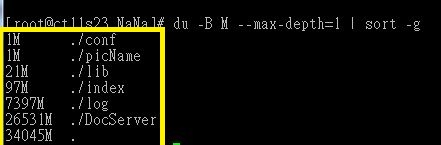
【Linux】查看子資料夾目錄的大小
- Oct 02 Wed 2013 09:53
-
【VMware】縮小Linux VMDK Size!
Linux
非常簡單,只要一行指令就搞定! 熟悉Linux的一看就知道,把zero.dat這個檔案填入無限的0,直到硬碟空間滿了就會自動停止,再把zero.dat這個檔案刪除。因為內容全都是0,所以軟體判斷未使用空間的內容都是空的,自然就可以正確釋放。
sudo dd if=/dev/zero of=zero.dat ; rm -f zero.dat 一行搞定
cat /dev/zero > zero.dat; rm -f zero.dat 這行指令也可以
非常簡單,只要一行指令就搞定! 熟悉Linux的一看就知道,把zero.dat這個檔案填入無限的0,直到硬碟空間滿了就會自動停止,再把zero.dat這個檔案刪除。因為內容全都是0,所以軟體判斷未使用空間的內容都是空的,自然就可以正確釋放。
sudo dd if=/dev/zero of=zero.dat ; rm -f zero.dat 一行搞定
cat /dev/zero > zero.dat; rm -f zero.dat 這行指令也可以
- Sep 26 Thu 2013 14:48
-
【VMware】縮小Windows VMDK Size!
To work around this issue, Storage vMotion the virtual machine or VMDK to a datastore that has a different block size. This reclaims the zeroed out disk space.
To shrink a thin provisioned disk (VMDK):
For example, if the VMDK is on a datastore formatted with 2 MB blocks, format the target VMFS datastore with a 1 MB, 4 MB, or 8 MB block size.
To reclaim the unused space of a virtual disk in ESXi/ESX 4.1 or later:
- Sep 10 Tue 2013 08:38
-
【Office】Disabling Stationery in Outlook 2007 & 2010 (停用outlook 2007及2010 佈景主題)
可透過GPO,將郵件格式設定為「RTF文件」。即使使用者設定好佈景主題,但新增郵件仍無法套用已設定好的佈景主題
Reference:http://www.404techsupport.com/2010/07/disabling-stationery-in-outlook-2007-2010/
Reference:http://www.404techsupport.com/2010/07/disabling-stationery-in-outlook-2007-2010/
- Sep 07 Sat 2013 16:31
-
【VMware】ESXi Server執行IBM DSA程式
Gather IBM DSA info from an ESXi server
by lunarg on June 23rd 2011, at 16:29
It is possible to gather DSA data from an IBM server running ESXi without having to boot with a bootable CD or reboot the server at all.
From any machine, Windows or linux, you can run the latest release of the DSA tool, then reference the ESXi server using commandline parameters when running the DSA tool.
Enable remote technical support in ESXi
In order for this to work, you need to put the ESXi server in remote technical support mode. This is done via the ESXi console.
Gather DSA data using a VM on the server (or via any other system)
Once activated, download and run the latest tool on your favourite platform (for Windows, choose the Windows version, etc.). Rather than opening running it by simply launching the application, fire up a command prompt and launch it with parameters.
>ibm_utl_dsa_dsyt85t-3.40_portable_windows_x86-64.exe --vmware-esxi user:password@ip-address
This will collect the DSA info through SSH.
Notice Not all information is available through this method. Certain RAID controllers cannot have their logs read through ESXi. In this case, you have to reboot and use the built-in preboot DSA tool.
by lunarg on June 23rd 2011, at 16:29
It is possible to gather DSA data from an IBM server running ESXi without having to boot with a bootable CD or reboot the server at all.
From any machine, Windows or linux, you can run the latest release of the DSA tool, then reference the ESXi server using commandline parameters when running the DSA tool.
Enable remote technical support in ESXi
In order for this to work, you need to put the ESXi server in remote technical support mode. This is done via the ESXi console.
 |  |
Gather DSA data using a VM on the server (or via any other system)
Once activated, download and run the latest tool on your favourite platform (for Windows, choose the Windows version, etc.). Rather than opening running it by simply launching the application, fire up a command prompt and launch it with parameters.
>ibm_utl_dsa_dsyt85t-3.40_portable_windows_x86-64.exe --vmware-esxi user:password@ip-address
This will collect the DSA info through SSH.
- Sep 07 Sat 2013 15:59
-
【網路】VPN線路比較
國際專線使用MPLS VPN、
一般線路的部分使用Internet VPN。
長途專線或IPLC
優點:線路品質最穩定,頻寬完全能掌握,在使用上能符合頻寬不能被干擾的企業應用要求。
缺點:建置或擴充的線路成本太高,一般的中小型企業比較不能接受把資金成本花在這個建置上。
MPLS VPN
優點:線路品質中上,在頻寬的使用上NSP大多能提出一個蠻高標準的QoS保證,使線路的使用上接近長途專線的品質,如果企業的分點有擴充時,也比較有彈性與優勢來增加,而在價格部分卻只有使用長途專線的1/10左右(視各地線路長短不同而有不同的比率)。
缺點:需與NSP的其他客戶共用主幹線頻寬,在遇到NSP本身的頻寬不足時,有時會被NSP其他更重要的客戶所排擠,產生線路不穩定的現象。此點雖NSP有提QoS保證,但真正遇到頻寬不足時,還是有可能被限制。
Internet VPN
優點:價格便宜。
缺點:線路品質不穩定,容易受Internet上流量的影響,因此如果企業的應用環境對頻寬會有所要求時,則不適合使用這種VPN架構,另外如果企業的據點分別在大陸與台灣,則不建議使用這個方式,因為會受到大陸對Internet管制的影響而不穩定。
一般線路的部分使用Internet VPN。
長途專線或IPLC
優點:線路品質最穩定,頻寬完全能掌握,在使用上能符合頻寬不能被干擾的企業應用要求。
缺點:建置或擴充的線路成本太高,一般的中小型企業比較不能接受把資金成本花在這個建置上。
MPLS VPN
優點:線路品質中上,在頻寬的使用上NSP大多能提出一個蠻高標準的QoS保證,使線路的使用上接近長途專線的品質,如果企業的分點有擴充時,也比較有彈性與優勢來增加,而在價格部分卻只有使用長途專線的1/10左右(視各地線路長短不同而有不同的比率)。
缺點:需與NSP的其他客戶共用主幹線頻寬,在遇到NSP本身的頻寬不足時,有時會被NSP其他更重要的客戶所排擠,產生線路不穩定的現象。此點雖NSP有提QoS保證,但真正遇到頻寬不足時,還是有可能被限制。
Internet VPN
優點:價格便宜。
缺點:線路品質不穩定,容易受Internet上流量的影響,因此如果企業的應用環境對頻寬會有所要求時,則不適合使用這種VPN架構,另外如果企業的據點分別在大陸與台灣,則不建議使用這個方式,因為會受到大陸對Internet管制的影響而不穩定。
- Aug 26 Mon 2013 16:07
-
【Report Services】如何修改Reporting Service的報表匯出選項
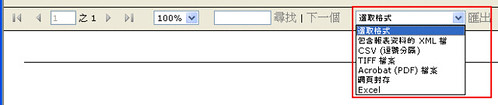
Reporting Service的每一張報表都可以匯出成HTML、PDF、Excel等多種格式,是很好用的功能。但在某些狀況下,你可能希望限制使用者只能匯出其中的幾種格式。
有兩種做法,如果你希望在停用整個Reporting Service對某種匯出格式的支援,可以修改RSReportServer.config,調整Render Node下的Extension。
- Aug 26 Mon 2013 16:03
-
【Report Services】Reporting Service Log Files 路徑
s18:C:\Program Files\Microsoft SQL Server\MSSQL.3\Reporting Services\LogFiles
- Aug 26 Mon 2013 15:41
-
【Reporting Service】Reporting Service 修改後部署仍無法正確顯示參數預設值問題
狀況說明:
報表參數有設定預設值上去,但使用者反映未有預設值。
解決方法:
1. Reporting Service組態
2. 報表管理員URL
3. 點選有問題頁面->屬性->刪除 button
4. 重新部署
報表參數有設定預設值上去,但使用者反映未有預設值。
解決方法:
1. Reporting Service組態
2. 報表管理員URL
3. 點選有問題頁面->屬性->刪除 button
4. 重新部署
- Aug 16 Fri 2013 08:08
-
【Server 2003】C槽莫名空間不足
狀況說明:
早上點檢發現S17(PLM)C槽空間不足,發現C:\Documents and Settings\All Users\Application Data\Microsoft\Windows NT\NTBackup\catalogs51 佔了將近9成的磁碟使用量,這些檔案為NETBACKUP產出,但平常也有利用棋他備份工具做系統備份,故將這些檔案刪除。
Reference:http://big5.ifeng.com/gate/big5/k.ifeng.com/4059054
早上點檢發現S17(PLM)C槽空間不足,發現C:\Documents and Settings\All Users\Application Data\Microsoft\Windows NT\NTBackup\catalogs51 佔了將近9成的磁碟使用量,這些檔案為NETBACKUP產出,但平常也有利用棋他備份工具做系統備份,故將這些檔案刪除。
Reference:http://big5.ifeng.com/gate/big5/k.ifeng.com/4059054
- Aug 09 Fri 2013 10:03
-
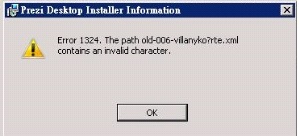
【Server 2008】Error 1324,The path xxx contains an invalid character
- Aug 07 Wed 2013 13:40
-
【VMware】Virtual Machine Disk 減肥
VMWare 很好用,但是用久了就發現硬碟不夠了
因為其中的 vmdk 檔(Virtual Machine Disk ),就是虛擬的硬碟越來越肥
奇怪的是其實系統只用了 3GB 的大小 vmdk 卻佔了 7GB,真是太虛胖了
其實 VMWare 本來就有提供 shrink 的方法
如果 VM 裡面有安裝 VMWare Tools 的話應該就可以找到 shrink 的功能幫磁碟減肥
如果像我一樣 VM 是 Linux 系統卻沒有 X-Window 的話可以使用 VMWare Tools 的指令
因為其中的 vmdk 檔(Virtual Machine Disk ),就是虛擬的硬碟越來越肥
奇怪的是其實系統只用了 3GB 的大小 vmdk 卻佔了 7GB,真是太虛胖了
其實 VMWare 本來就有提供 shrink 的方法
如果 VM 裡面有安裝 VMWare Tools 的話應該就可以找到 shrink 的功能幫磁碟減肥
如果像我一樣 VM 是 Linux 系統卻沒有 X-Window 的話可以使用 VMWare Tools 的指令
