- Aug 09 Fri 2013 10:03
-
【Server 2008】Error 1324,The path xxx contains an invalid character

- Aug 07 Wed 2013 13:40
-
【VMware】Virtual Machine Disk 減肥
VMWare 很好用,但是用久了就發現硬碟不夠了
因為其中的 vmdk 檔(Virtual Machine Disk ),就是虛擬的硬碟越來越肥
奇怪的是其實系統只用了 3GB 的大小 vmdk 卻佔了 7GB,真是太虛胖了
其實 VMWare 本來就有提供 shrink 的方法
如果 VM 裡面有安裝 VMWare Tools 的話應該就可以找到 shrink 的功能幫磁碟減肥
如果像我一樣 VM 是 Linux 系統卻沒有 X-Window 的話可以使用 VMWare Tools 的指令
因為其中的 vmdk 檔(Virtual Machine Disk ),就是虛擬的硬碟越來越肥
奇怪的是其實系統只用了 3GB 的大小 vmdk 卻佔了 7GB,真是太虛胖了
其實 VMWare 本來就有提供 shrink 的方法
如果 VM 裡面有安裝 VMWare Tools 的話應該就可以找到 shrink 的功能幫磁碟減肥
如果像我一樣 VM 是 Linux 系統卻沒有 X-Window 的話可以使用 VMWare Tools 的指令
- Jun 19 Wed 2013 22:28
-
【SharePoint2010】快速縮小 SQL Server Log 檔案大小
Reference:http://markit.serveblog.net/wordpress/2013/01/30/%e5%bf%ab%e9%80%9f%e7%b8%ae%e5%b0%8f-sql-server-log-%e6%aa%94%e6%a1%88%e5%a4%a7%e5%b0%8f/
- May 27 Mon 2013 08:59
-
【VMware】移除不必要的vCenter Plugin
Reference:http://www.virtuallyghetto.com/2010/07/how-to-unregister-vcenter.html
- Apr 12 Fri 2013 16:12
-
【Linux】Linux安裝Oracle db 11gR2
Reference:http://rritw.com/a/caozuoxitong/Linux/20120817/206235.html
- Apr 12 Fri 2013 16:08
-
【Linux】Redhat 出現”This system is not registered with RHN”
【狀況說明】
安裝好RedHat後,使用yum指令,便出現「This system is not registered with RHN 」錯誤訊息。
【解決方法】
更换/etc/yum.repos.d/rhel-debuginfo.repo 這個文件。進入/etc/yum.repos.d/目錄,输入
wget http://docs.linuxtone.org/soft/lemp/CentOS-Base.repo
即可在此目錄下得到CentOS-Base.repo文件,這是centos的文件
安裝好RedHat後,使用yum指令,便出現「This system is not registered with RHN 」錯誤訊息。
【解決方法】
更换/etc/yum.repos.d/rhel-debuginfo.repo 這個文件。進入/etc/yum.repos.d/目錄,输入
wget http://docs.linuxtone.org/soft/lemp/CentOS-Base.repo
即可在此目錄下得到CentOS-Base.repo文件,這是centos的文件
- Apr 11 Thu 2013 16:18
-
【Office】嘗試啟動 Outlook 2003 時,出現錯誤訊息:「MAPI32.DLL 可能損壞或版本不正確」
【狀況說明】
同事電腦本安裝Outlook 2003,但同時安裝Outlook 2010,又再移除Outlook 2010 後,欲開啟Outlook 2003,出現「MAPI32.DLL 可能損壞或版本不正確 」錯誤訊息
【解決方法】
Reference:http://support.microsoft.com/kb/926196/zh-tw
同事電腦本安裝Outlook 2003,但同時安裝Outlook 2010,又再移除Outlook 2010 後,欲開啟Outlook 2003,出現「MAPI32.DLL 可能損壞或版本不正確 」錯誤訊息
【解決方法】
Reference:http://support.microsoft.com/kb/926196/zh-tw
- Mar 28 Thu 2013 11:15
-
【Server 2008】Windows Server 2008 命令提示字元的中文變問號
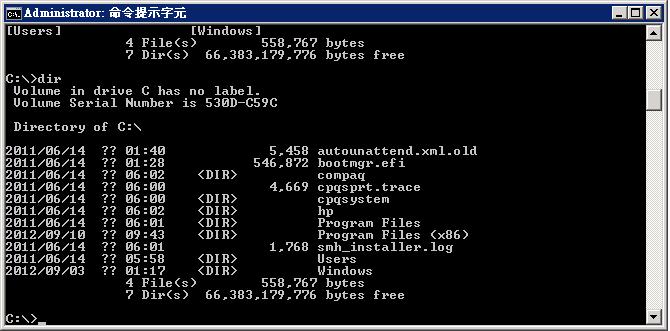
剛裝好的Windows Server 2008,在命令提示字元中,中文會顯示問號
進到控制台/地區及語言/系統管理,點選變更系統地區設定,把非Unicode程式的語言改為中文(繁體,台灣),中文就會顯示正常!
Reference:http://shulee.blogspot.tw/2012/09/windows-server-2008.html
- Mar 04 Mon 2013 16:55
-
【VMware】VMware ESXi 5 VM reset stuck at 95%
狀況說明:
開啟ESX 4.1內的某VM,發現常時間停在95%,待一段時間後,無法開啟Console,出現「unable to connect to the mks ...」
解決方法:
With vSphere Client, connect to the host or the VC server that controls the host.
Click on the host and go to the Configuration tab.
Click on Security Profile.
Click on Properties in the Services table.
Start ESXi Shell and SSH services.
Open a SSH session to the host.
Execute /sbin/services.sh restart. This will restart all agents. The vSphere Client or the vCenter server will lose connection to the host. Reconnect! The VM may show as (invalid).
Find the PID of the process by typing ps|grep “<VMName>”. The second number before the name of the VM is the PID.
Kill the process by typing kill -9 <PID>.
Go to /vmfs/volumes/<DataStoreName>/<VMName>.
Delete the swap file by typing rm –r <SwappFileName.vswp>
In vSphere Client right click the VM and select Remove From Inventory.
Browse the data store, open the VM folder, right click on the .vmx file and select Add to Inventory.
Power On the VM.
開啟ESX 4.1內的某VM,發現常時間停在95%,待一段時間後,無法開啟Console,出現「unable to connect to the mks ...」
解決方法:
With vSphere Client, connect to the host or the VC server that controls the host.
Click on the host and go to the Configuration tab.
Click on Security Profile.
Click on Properties in the Services table.
Start ESXi Shell and SSH services.
Open a SSH session to the host.
Execute /sbin/services.sh restart. This will restart all agents. The vSphere Client or the vCenter server will lose connection to the host. Reconnect! The VM may show as (invalid).
Find the PID of the process by typing ps|grep “<VMName>”. The second number before the name of the VM is the PID.
Kill the process by typing kill -9 <PID>.
Go to /vmfs/volumes/<DataStoreName>/<VMName>.
Delete the swap file by typing rm –r <SwappFileName.vswp>
In vSphere Client right click the VM and select Remove From Inventory.
Browse the data store, open the VM folder, right click on the .vmx file and select Add to Inventory.
Power On the VM.
- Feb 21 Thu 2013 10:15
-
【Vmware】再生龍將整顆實體硬碟備份,異機還原至其他機器上

狀況說明:
昨日發現一台esx 4.0主機其中一顆硬碟故障(做RAID 1),利用clone vm方式也無法將vm備份出來。
解決方法:
1.利用再生龍,將整顆硬碟備份成映像檔,然後測試異機還原,出現錯誤訊息如下:* vsd-mount .................................................... [Failed]
You have entered the recovery shell. The situation you are in may be recoverable.
If you are able to fix this situation the boot process will continue normally after you exit this terminal.
/Bin/SH: cant access TTY job control turned off
- Jan 16 Wed 2013 13:41
-
【VMware】VirtualCenter Management Webservices服務無法啟動
- Nov 23 Fri 2012 11:59
-
【VMware】vSphere 5.1: vMotion with no Shared Storage
