如果公司用的 AD 哪一天突然掛了,造成服務停擺那就慘了
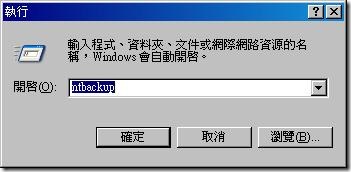
我們可使用內建的 NtBackup 來作完整的資料備份
1. 開始 / 執行 輸入 ntbackup
masterman 發表在 痞客邦 留言(0) 人氣(394)
範例:
dsacls “ou=User Accounts,dc=contoso,dc=com“
masterman 發表在 痞客邦 留言(0) 人氣(227)
Software Deployment Options |
Publish (User Only) |
Assign (User) |
Assign (Computer) |
After deployment of the GPO, the software is available for installation: |
The next time a user logs on. |
The next time a user logs on. |
The next time the computer starts. |
Typically, the user installs the software from: |
Add Or Remove Programs in Control Panel (Windows XP) or Programs And Features (Windows Server 2008, Windows Vista, Windows 7). |
Start menu or desktop shortcut. An application can also be configured to install automatically at logon. |
The software is installed automatically when the computer starts up. |
If the software is not installed and the user opens a file associated with the software, does the software install? |
Yes (if auto-install is enabled). |
Yes. |
Does not apply; the software is already installed. |
Can the user remove the software by using Control Panel? |
Yes, and the user can choose to install it again from Control Panel. |
Yes, and the software is available for installation again from the Start menu shortcuts or file associations. |
No. Only a local administrator can remove the software; a user can run a repair on the software. |
Supported installation files: |
Windows Installer packages (.msi files), .zap files. |
Windows Installer packages (.msi files). |
Windows Installer packages (.msi files). |
masterman 發表在 痞客邦 留言(0) 人氣(605)
安裝前注意事項:
**Remote Server Administration Tools for Windows 7 can be installed ONLY on computers that are running the Enterprise, Professional, or Ultimate editions of Windows 7. This software CANNOT BE INSTALLED on computers that are running Windows 7 with Service Pack 1 (SP1). To run Remote Server Administration Tools for Windows 7 on a computer on which you want to run Windows 7 with SP1, first install Remote Server Administration Tools, and then upgrade to Service Pack 1.**
註:主要是安裝RSAT前,不要先安裝wIN 7 SP1
masterman 發表在 痞客邦 留言(0) 人氣(1,977)
想要查詢自己被套用哪些群組原則嗎?
1. Type gpresult /r and press ENTER.
masterman 發表在 痞客邦 留言(0) 人氣(7,349)
首先安裝 IIS 網頁伺服器
勾選 ASP.NET
Windows 驗證
IIS 6 Metabase 相容性
masterman 發表在 痞客邦 留言(0) 人氣(509)
10.X.X.X/8
172.16.X.X/16~172.31.X.X/16
192.168.0.X/24~192.168.255.X/24
masterman 發表在 痞客邦 留言(0) 人氣(44)

壓網路線對於網路工程師而言,是平時備而不用,但一年卻免不了要碰上幾次的事情。
所以最好還是把這個技術學起來以備不時之需,壓網路線可以說是網路工程師必備的技能。
1. 網路線
網路線除了少數光纖骨幹以外,其餘均使用速度為 10/100 Mbps 的 Ethernet,大多都可在電腦商場買到。
masterman 發表在 痞客邦 留言(0) 人氣(462)
如果對方是Windows的作業系統的話
可以試試
nbtstat -A 電腦IP
masterman 發表在 痞客邦 留言(0) 人氣(152)
發生這種狀況不需要重新開機
可以用下列步驟即可恢復
1、啟動本機服務,把Print Spooler這個服務給停止
2、到c:\windows\system32\spool\printers 把裡頭的檔案全部刪除
3、到本機服務把Print Spooler重新啟動
可做成批次檔
net stop spooler
del %systemroot%\system32\spool\printers\*.shd
del %systemroot%\system32\spool\printers\*.spl
net start spooler
masterman 發表在 痞客邦 留言(0) 人氣(145)

 IT人生 (2)